


'%3e%3cpath%20d='M14.8644%204.33597C15.6164%203.58397%2016.3844%203.58397%2017.1364%204.33597L20.4644%207.66397C21.2164%208.41597%2021.6004%209.32797%2021.6004%2010.4V17.6C21.6004%2018.672%2021.3924%2020%2020.0004%2020.8C20.0004%2020.8%2017.6804%2022.4%2016.0004%2022.4C14.3204%2022.4%2012.0004%2020.8%2012.0004%2020.8C10.4004%2020%2010.4004%2018.672%2010.4004%2017.6V10.4C10.4004%209.32797%2010.7844%208.41597%2011.5364%207.66397L14.8644%204.33597Z'%20stroke='%234FA49A'%20stroke-width='1.92'%20stroke-linejoin='round'/%3e%3cpath%20d='M16.0001%2015.0402C17.0605%2015.0402%2017.9201%2014.1806%2017.9201%2013.1202C17.9201%2012.0598%2017.0605%2011.2002%2016.0001%2011.2002C14.9397%2011.2002%2014.0801%2012.0598%2014.0801%2013.1202C14.0801%2014.1806%2014.9397%2015.0402%2016.0001%2015.0402Z'%20stroke='%234FA49A'%20stroke-width='1.92'/%3e%3cpath%20d='M10.4007%2014.3999L7.20067%2017.5999L6.40067%2020.7999C6.19267%2021.3279%206.35267%2021.5999%206.88067%2021.5999L10.4007%2020.7999'%20stroke='%234FA49A'%20stroke-width='1.92'%20stroke-linecap='round'%20stroke-linejoin='round'/%3e%3cpath%20d='M21.5996%2014.3999L24.7996%2017.5999L25.5996%2020.7999C25.8076%2021.3279%2025.6476%2021.5999%2025.1196%2021.5999L21.5996%2020.7999'%20stroke='%234FA49A'%20stroke-width='1.92'%20stroke-linecap='round'%20stroke-linejoin='round'/%3e%3cpath%20d='M13.2793%2022.3999C13.2793%2024.7999%2014.3993%2027.0399%2015.9993%2028.3199C17.5993%2027.0399%2018.7193%2024.7999%2018.7193%2022.3999'%20stroke='%234FA49A'%20stroke-width='1.92'%20stroke-linecap='round'%20stroke-linejoin='round'/%3e%3c/g%3e%3cdefs%3e%3cclipPath%20id='clip0_11502_52996'%3e%3crect%20width='32'%20height='32'%20fill='white'/%3e%3c/clipPath%3e%3c/defs%3e%3c/svg%3e)

Product managers and UX designers
Planning the initial launch experience for a non-profit support app, including animations and push notifications.
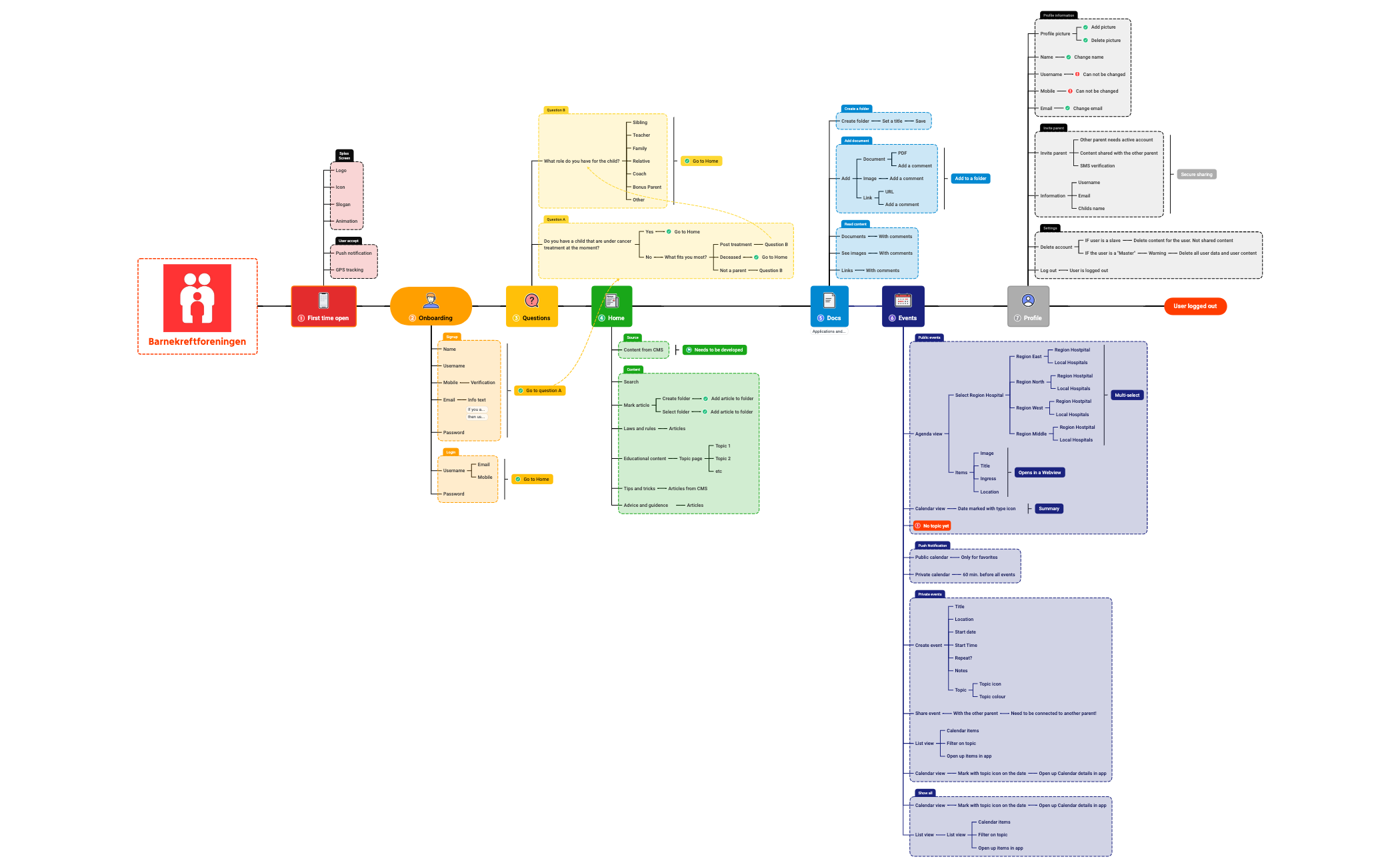
The Barnekreftforeningen mind map template provides a comprehensive 171-node overview of the childhood cancer support organization's digital platform, covering user onboarding, content delivery, document management, event scheduling, and profile settings. This Barnekreftforeningen template is designed for app developers, UX designers, and project managers building a mobile or web application for the Norwegian Children's Cancer Society. It includes detailed branches such as 'First time open' with logo, animation, and GPS tracking, and 'Questions' that ask 'What role do you have for the child?' and 'Do you have a child that are under cancer treatment at the moment?'. The template serves as a functional specification or product roadmap, mapping out user flows from first-time launch to logged-out state. Organized as a single-sheet mind map with 13 top-level branches, it visually structures the app's core features and user journeys. This Barnekreftforeningen cheat sheet is ideal for teams needing a clear, actionable blueprint for developing a support app for families affected by childhood cancer.
使用條款Planning the initial launch experience for a non-profit support app, including animations and push notifications.
Defining user registration and onboarding flows for a mobile application serving families with sick children.
Structuring content delivery and document management features for a healthcare-related community platform.
Open the .xmind file to explore the comprehensive 171-node structure covering onboarding, content delivery, and profile settings.
Modify the existing branches by renaming nodes or adding specific technical notes to tailor the functional specification to your project needs.
Use task icons to monitor development status before exporting the map as a PDF or image to align with project stakeholders.
The template includes 171 nodes covering user flows for first-time open, onboarding, questions, home content, documents, events, profile, and logged-out state. It details features like push notifications, GPS tracking, content management, and calendar views.
Use this template as a functional specification or product roadmap. Open the .xmind file in Xmind, then customize each branch to match your app's requirements. Add or remove nodes to define user stories, screen flows, and feature details.
Yes, the template is fully editable in Xmind (desktop, web, or mobile). You can modify node text, add icons, and rearrange branches. It is available as a free download from the Xmind template marketplace.
The 'Questions' branch captures user role and treatment status with two key questions: 'What role do you have for the child?' and 'Do you have a child that are under cancer treatment at the moment?'. This helps personalize the app experience.
The 'Events' section includes agenda view, calendar view, public and private calendars, and features to create and share events. It supports both list and calendar views for flexible scheduling.
把你的心智圖範本分享給全球創作者,從你的作品中獲得收益。

