


'%3e%3cpath%20fill-rule='evenodd'%20clip-rule='evenodd'%20d='M16.0002%203.2002C8.93095%203.2002%203.2002%208.93095%203.2002%2016.0002C3.2002%2023.0695%208.93095%2028.8002%2016.0002%2028.8002C23.0695%2028.8002%2028.8002%2023.0695%2028.8002%2016.0002C28.8002%208.93095%2023.0695%203.2002%2016.0002%203.2002ZM5.6002%2016.0002C5.6002%2010.2564%2010.2564%205.6002%2016.0002%205.6002C21.744%205.6002%2026.4002%2010.2564%2026.4002%2016.0002C26.4002%2021.744%2021.744%2026.4002%2016.0002%2026.4002C10.2564%2026.4002%205.6002%2021.744%205.6002%2016.0002ZM16.0002%208.0002C11.5819%208.0002%208.0002%2011.5819%208.0002%2016.0002C8.0002%2020.4184%2011.5819%2024.0002%2016.0002%2024.0002C20.4184%2024.0002%2024.0002%2020.4184%2024.0002%2016.0002C24.0002%2011.5819%2020.4184%208.0002%2016.0002%208.0002ZM10.4002%2016.0002C10.4002%2012.9074%2012.9074%2010.4002%2016.0002%2010.4002C19.093%2010.4002%2021.6002%2012.9074%2021.6002%2016.0002C21.6002%2019.093%2019.093%2021.6002%2016.0002%2021.6002C12.9074%2021.6002%2010.4002%2019.093%2010.4002%2016.0002ZM16.0002%2013.6002C14.6747%2013.6002%2013.6002%2014.6747%2013.6002%2016.0002C13.6002%2017.3256%2014.6747%2018.4002%2016.0002%2018.4002C17.3256%2018.4002%2018.4002%2017.3256%2018.4002%2016.0002C18.4002%2014.6747%2017.3256%2013.6002%2016.0002%2013.6002Z'%20fill='%2352AA6F'/%3e%3c/g%3e%3cdefs%3e%3cclipPath%20id='clip0_11502_53678'%3e%3crect%20width='32'%20height='32'%20fill='white'/%3e%3c/clipPath%3e%3c/defs%3e%3c/svg%3e)

Design directors and brand strategists
Conducting an annual brand design retrospective with your creative team
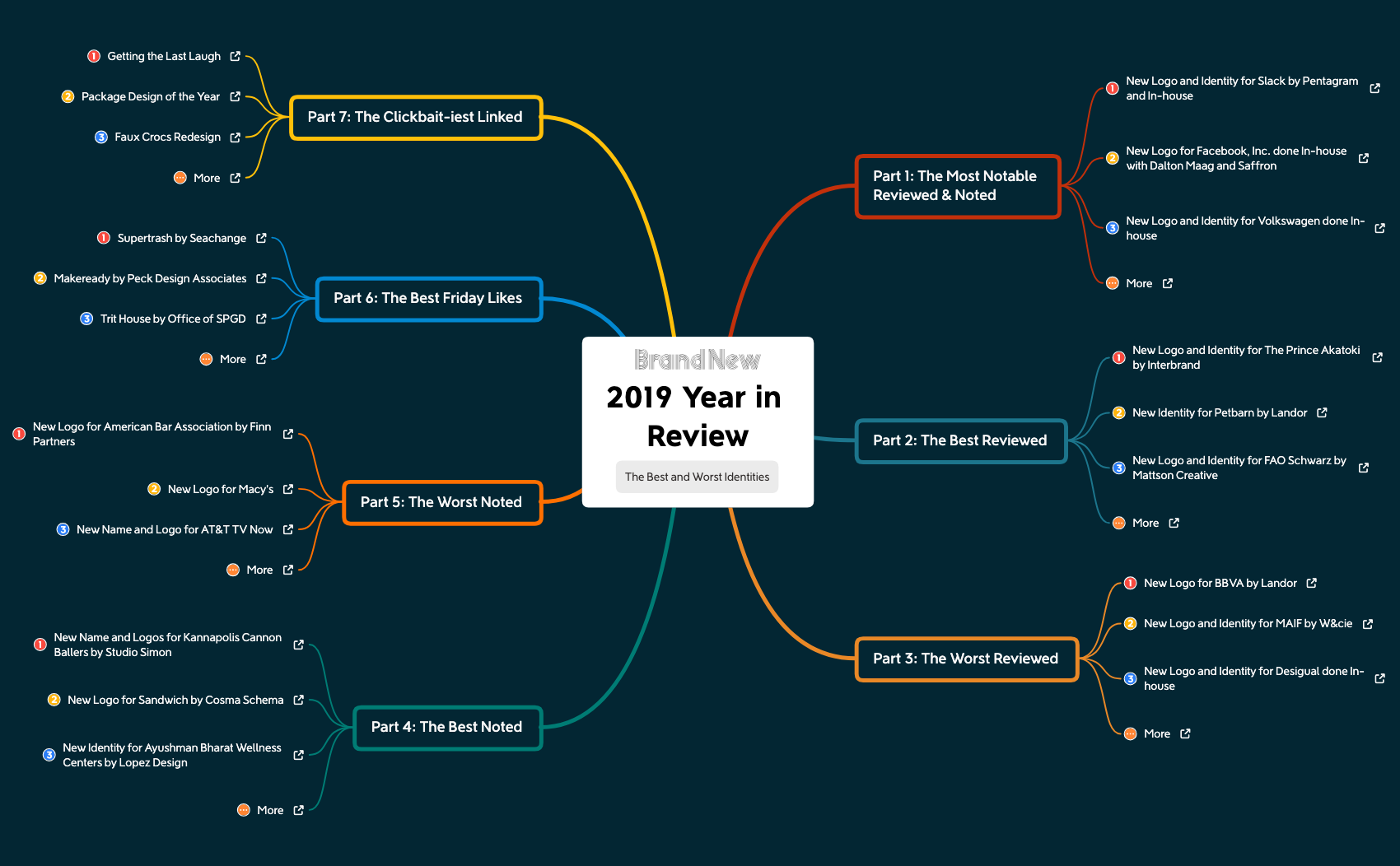
The 2019 Year in Review mind map template is a curated retrospective for brand and design professionals, covering 37 notable identity projects from 2019 across seven categories. It includes specific entries like 'New Logo and Identity for Slack by Pentagram and In-house' and 'New Logo for Facebook, Inc. done In-house with Dalton Maag and Saffron', organized into sections such as 'Part 1: The Most Notable Reviewed & Noted' and 'Part 2: The Best Reviewed'. This template serves as a cheat sheet for reviewing the year's best and worst logo and identity work, with a final 'The Best and Worst Identities' summary. It's ideal for designers, brand strategists, and marketers looking to analyze trends and benchmark creative output.
Terms and ConditionsConducting an annual brand design retrospective with your creative team
Preparing a trend report for clients on logo and identity changes in 2019
Teaching a class on brand identity evolution and critiquing real-world examples
Open the template in Xmind to navigate through the curated branches of 2019 identity projects and notable brand reviews.
Click on specific nodes to read project details and add your own professional notes, ratings, or additional brand categories.
Save your finalized retrospective as an image or PDF to share design trends and benchmarks with your creative team.
It includes 37 curated logo and identity projects from 2019, organized into seven categories like 'The Most Notable Reviewed & Noted' and 'The Best Reviewed', plus a final summary of best and worst identities.
Open the .xmind file in Xmind, then navigate each branch to review projects. Customize by adding your own notes or ratings, and use the structure to compare best vs. worst examples.
Yes, the template is fully editable in Xmind. You can add new projects, modify existing entries, or reorganize the categories to fit your own retrospective.
Absolutely. Duplicate the template and replace the project entries with those from any other year to create a custom annual review.
Use Xmind's presentation mode to walk through each category. Export as an image or PDF to share key insights, or embed the mind map in a slide deck.
Share your mind map templates with creators around the world and start earning from your work.

