 Xmind Favorites
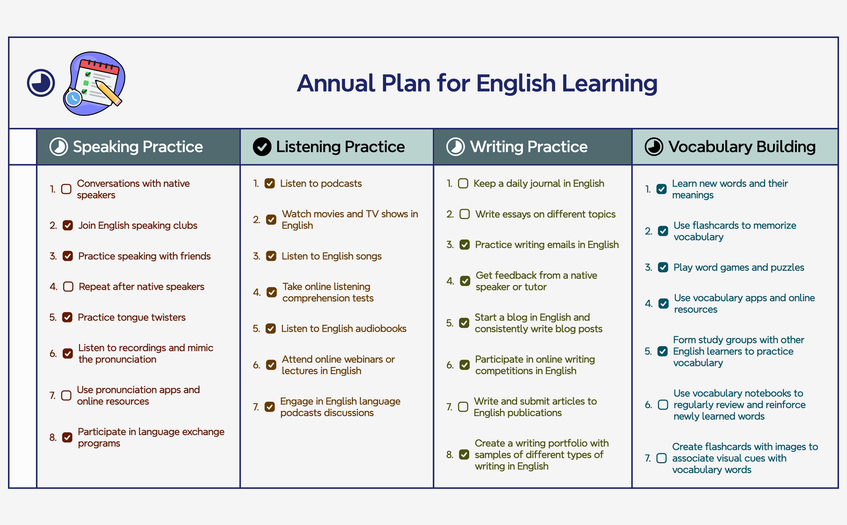
Annual Plan for English Learning
Free

'%3e%3cpath%20fill-rule='evenodd'%20clip-rule='evenodd'%20d='M16.0002%203.2002C8.93095%203.2002%203.2002%208.93095%203.2002%2016.0002C3.2002%2023.0695%208.93095%2028.8002%2016.0002%2028.8002C23.0695%2028.8002%2028.8002%2023.0695%2028.8002%2016.0002C28.8002%208.93095%2023.0695%203.2002%2016.0002%203.2002ZM5.6002%2016.0002C5.6002%2010.2564%2010.2564%205.6002%2016.0002%205.6002C21.744%205.6002%2026.4002%2010.2564%2026.4002%2016.0002C26.4002%2021.744%2021.744%2026.4002%2016.0002%2026.4002C10.2564%2026.4002%205.6002%2021.744%205.6002%2016.0002ZM16.0002%208.0002C11.5819%208.0002%208.0002%2011.5819%208.0002%2016.0002C8.0002%2020.4184%2011.5819%2024.0002%2016.0002%2024.0002C20.4184%2024.0002%2024.0002%2020.4184%2024.0002%2016.0002C24.0002%2011.5819%2020.4184%208.0002%2016.0002%208.0002ZM10.4002%2016.0002C10.4002%2012.9074%2012.9074%2010.4002%2016.0002%2010.4002C19.093%2010.4002%2021.6002%2012.9074%2021.6002%2016.0002C21.6002%2019.093%2019.093%2021.6002%2016.0002%2021.6002C12.9074%2021.6002%2010.4002%2019.093%2010.4002%2016.0002ZM16.0002%2013.6002C14.6747%2013.6002%2013.6002%2014.6747%2013.6002%2016.0002C13.6002%2017.3256%2014.6747%2018.4002%2016.0002%2018.4002C17.3256%2018.4002%2018.4002%2017.3256%2018.4002%2016.0002C18.4002%2014.6747%2017.3256%2013.6002%2016.0002%2013.6002Z'%20fill='%23F07F5D'/%3e%3c/g%3e%3cdefs%3e%3cclipPath%20id='clip0_11502_53370'%3e%3crect%20width='32'%20height='32'%20fill='white'/%3e%3c/clipPath%3e%3c/defs%3e%3c/svg%3e)
158 templates · Practical study planner templates to organize subjects, sessions, and deadlines.
Xmind Favorites Xmind Favorites
 Xmind Favorites
 Xmind Favorites
 Xmind Favorites
 Xmind Favorites
 Xmind Favorites
 Xmind Favorites
 Xmind Favorites
 Xmind Favorites
 Xmind Favorites
 Xmind Favorites
Plan subjects, schedule sessions, and stay ahead of deadlines with Xmind.
Every study planner template in this library is designed to help students, teachers, and self-learners organize complex academic workloads into manageable visual maps. This use case covers the entire educational lifecycle, ranging from daily and weekly schedules to long-term exam preparation timelines and subject-specific learning paths. Students can map out revision cycles for finals, while lifelong learners can use these structures to track progress through online certifications or personal skill development. The available templates include specialized layouts for tracking lecture notes, managing reading lists, and breaking down large research projects into actionable milestones. By providing a spatial overview of deadlines and curriculum requirements, these templates help users maintain a consistent study rhythm. Whether you are preparing for standardized testing or coordinating a semester-long syllabus, these visual frameworks ensure that no subject or deadline is overlooked during the academic year.
Visualizing a study planner template allows students to see overlapping deadlines and exam dates across multiple subjects on a single infinite canvas.
The non-linear structure of Xmind helps self-learners break down dense textbook chapters into hierarchical nodes for better retention and faster revision.
Xmind AI Copilot can instantly generate sub-topics for complex subjects or suggest a logical sequence for a new learning curriculum.
Users can attach lecture slides, research PDFs, and web links directly to specific nodes to keep all study materials in one place.
The Pitch Mode feature allows teachers to transform a static study plan into an automated presentation for classroom orientation sessions.
Select a template Browse the library and choose a study planner template that matches your current academic goal or exam schedule.
Map your curriculum Input your core subjects as main topics and add branches for specific chapters, assignments, and required reading materials.
Set deadlines and priorities Use task markers and labels to indicate exam dates and the difficulty level of each topic within your study plan.
Attach external resources Insert hyperlinks to online lectures and upload your syllabus documents directly into the map for centralized access.
Review and update progress Regularly adjust your learning path as you complete modules and use the export feature to print a physical copy for your desk.
Many community Study Planner templates are free for anyone to open and use immediately. Premium templates require a one-time purchase per file rather than a recurring subscription. After purchasing a template, you own the file permanently and can open or edit it offline in the Xmind app.
Turn your best mind maps into templates the whole community can use.
